


TopScan
3.1305.00 Reviews
App Specs
- Version
- 6.40.100
- Updated On
- License
- Free
- Downloads
- 100,000+
- Developer
- TopDon
- Categories
- Tools
- Platform
- Android
Screenshots
 Analysis by AppCompare
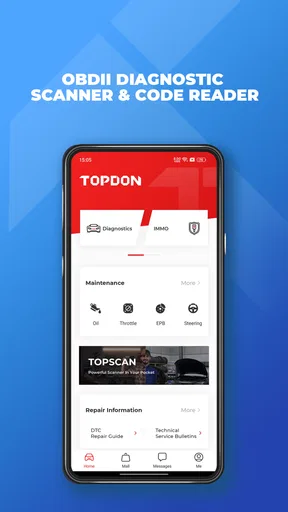
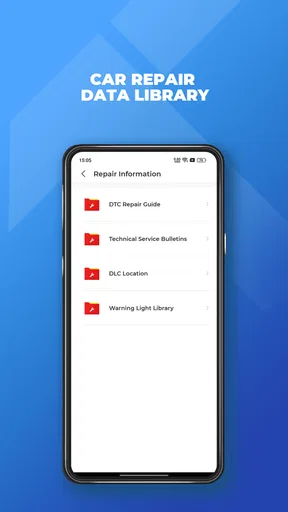
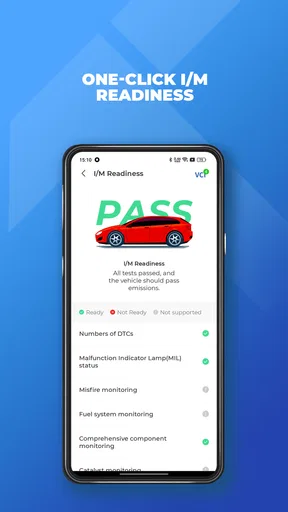
I judge a vehicle scan tool by what it helps me decide before I spend time or money, not by how many technical terms it displays. TopScan is a diagnostic app from TopDon HK, designed to work with a compatible vehicle connection and turn a phone into a way to read vehicle information. That makes it a different kind of tool from the document-scanning app described in the published text: its purpose is checking a car, not digitizing paperwork. I would consider it when a warning light appears and I want a first look at what the vehicle is reporting, while keeping in mind that a phone-based scan is not a substitute for a mechanic’s diagnosis.
What a diagnostic scan can tell you
The key capability here is reading diagnostic information through the vehicle’s OBDII system. In practical terms, that can give a driver a starting point when the dashboard shows a warning or the car behaves differently. A code is a clue about a system or condition the vehicle has detected; it is not, by itself, proof that one particular part has failed. I find that distinction important, because a code reader is most useful when it helps you ask a better question rather than encouraging you to buy a replacement part immediately.
That makes this sort of app especially useful for an initial check. If a warning light comes on before a commute, a scan may help you decide whether to arrange prompt professional attention, gather more information, or avoid making assumptions. It can also give a garage a clearer starting point when you describe the issue. I would still treat the result as one piece of evidence alongside the car’s symptoms, maintenance history, and a qualified inspection.
How I would use it at the car
The basic workflow is straightforward in concept: connect a compatible diagnostic device to the vehicle, use the app to communicate with it, and review the information returned. The app itself is not a magic fix and cannot diagnose a mechanical problem simply by being installed. Before relying on it, I would check that my phone can run it and that the diagnostic hardware and vehicle setup are suitable for the task. A particularly important compatibility detail is that it cannot support 32-bit cell phones, so owners of those devices should look elsewhere rather than discovering the mismatch after setup.
For a first scan, I would park safely, make sure the car is in a suitable state for the connected equipment, and note the exact warning or symptom before opening the app. That note matters: a code can be easier to interpret when you know whether the engine was hesitating, a light appeared only once, or the issue is persistent. I would record the result before clearing or changing anything. Keeping the original information gives you something useful to discuss with a technician and reduces the chance of losing context by treating a reset as a repair.
There is also a practical difference between reading a code and deciding what to do about it. A reader can narrow the conversation, but the next step may still be checking wiring, inspecting a component, or testing the car under the conditions that triggered the alert. If I were helping a friend, I would use the scan to prepare for that conversation, not to promise that the app can identify every cause on its own.
A useful moment: a warning before a trip
Imagine a dashboard warning appears the evening before a long drive. A quick scan can make the situation less vague: instead of guessing from a symbol alone, you may have diagnostic information to share with a repair shop. That can help you explain what happened and ask whether the car should be checked before setting off. If the car is running poorly, the warning is serious, or the scan result leaves you uncertain, I would not use an app reading as permission to continue driving. Safety and an in-person assessment come first.
Worth Reading Before You Choose

EA SPORTS FC Mobile 26 Is a Bigger Football Game, but It Takes Time

Flipboard Shows What News Apps Must Do Beyond the Feed

Switching to Android Auto Means Rethinking Your Driving Routine

Google Calendar Makes a Crowded Week Easier to Manage

Ludo King Makes the Most of the Minutes Between Plans

Baby Panda World Brings Quick Play to Modern Phones, but Its Game Library Feels Busy
This is where I see the most sensible everyday value. A driver who already owns compatible hardware can use a phone as a convenient first step without arranging a full workshop visit just to learn what information the vehicle is reporting. It may be handy for a household that maintains more than one compatible car, too, provided the user understands that different symptoms can require different investigations. The benefit is not that every repair becomes a do-it-yourself job; it is that the owner can approach the next decision with more context.
Where it fits among the alternatives
Compared with a basic standalone code reader, a phone app can be more convenient to handle and review, especially for someone who already uses a smartphone as their everyday reference point. A simple handheld reader may be preferable if you want a dedicated device that does not depend on a phone being compatible or available. At the other end, a professional workshop tool and a mechanic’s testing process are better choices when the problem is intermittent, safety-related, or requires deeper investigation than an initial code check.
I would not choose a diagnostic app just because it promises more information than a basic reader. The useful question is whether its supported functions match the vehicle and the decision you need to make. For someone who only wants to know why a warning has appeared, a basic reader may be enough. Someone who needs a repair confirmed, or who works on vehicles professionally, should compare the app and its compatible hardware with the diagnostic depth and workflow they actually need.
Costs, compatibility, and the honest limits
The app is free to install, though in-app purchases range from $0.99 to $179.99 per item. I would check what a particular purchase covers before committing, especially if my needs are limited to occasional scans. A high-priced option only makes sense if its functions are relevant to the vehicle and work I plan to do; the existence of paid items is not a reason to assume that every owner needs them.
Its average rating is 3.2 from around 1,100 ratings, alongside roughly 249 written reviews, so I would approach it with measured expectations rather than assuming every setup will be effortless. It has over 100,000 installs, is rated for Everyone, and its current version is 6.20.004, with Android 7.0 as the minimum operating-system requirement. Those details help with basic suitability, but they do not guarantee that a specific phone, adapter, or vehicle combination will work as expected. I would verify compatibility before relying on it for a time-sensitive problem.
The strongest limitation is inherent to code reading: information from the car can point toward a system without identifying the exact fault. A loose connection, a failing component, or another underlying issue may need proper testing to distinguish. Users who expect a one-tap repair recommendation may find that frustrating. I think the app makes more sense for a curious owner who is willing to interpret a result cautiously than for someone looking for certainty without further checks.
Who gets the most from it
I would recommend considering TopScan if you want a first-pass look at vehicle diagnostic information, have compatible equipment, and are comfortable treating a code as a lead rather than a verdict. It can be especially helpful for a driver who wants to explain a warning more clearly when speaking to a repair shop, or for someone who likes to keep a record of what prompted an inspection. For either use, writing down the symptoms and scan result before taking further action is a small step that can make the information more useful.
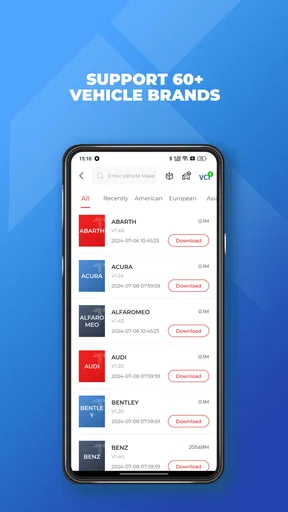
I would skip it if your phone is 32-bit, if you do not have suitable diagnostic hardware, or if you need a professional-level answer to a complicated fault. It is also not the right tool for deciding whether a car with worrying symptoms is safe to drive. In those cases, a compatible dedicated reader or a qualified technician is a better route, depending on whether you need a basic code check or a full diagnosis.
Getting Started with TopScan
Downloading and installing the app was a piece of cake. Available on both Android and iOS, TopScan has a user-friendly interface that even the least tech-savvy among us can navigate. Upon opening the app, you're greeted with a clean, intuitive design. No clutter, just straightforward options that guide you through the scanning process.
Scanning Magic
Using TopScan is almost magical. You simply point your phone's camera at the document, and the app does the rest. It automatically detects edges, adjusts the lighting, and even straightens the document if your hand isn’t the steadiest. The first time I tried it, I was amazed at how clear and professional the scanned document looked. The quality rivals that of traditional scanners, which is impressive for a mobile app.
Features That Stand Out
What makes TopScan truly stand out are its additional features. Here are a few that caught my attention:
- OCR Technology: The Optical Character Recognition feature is a game-changer. It allows you to convert scanned documents into editable text. Perfect for those times when you need to quickly edit a paper or extract information.
- Cloud Integration: Seamlessly save your scans to Google Drive, Dropbox, or any other cloud service. This is super handy for accessing your documents from any device.
- Multiple Formats: Save your scans in various formats like PDF, JPEG, or PNG. Depending on your needs, you can choose the format that works best for you.
Everyday Use
For everyday use, TopScan is a real lifesaver. Whether you’re a student needing to digitize notes or a professional keeping track of receipts, this app makes the process seamless. I’ve found myself using it more often than I anticipated, and it’s always reliable.
One of the things I appreciate most is the app’s speed. Scans are processed quickly, and the app runs smoothly without any noticeable lag. Plus, the ability to organize your documents within the app itself makes it easier to keep track of everything.
Room for Improvement?
While TopScan is fantastic, there’s always room for improvement. Occasionally, the edge detection feature struggles with documents that have very light edges, requiring a bit of manual adjustment. However, this is a minor hiccup and doesn’t detract significantly from the overall experience.
Another thing to mention is that while the basic features are free, some advanced features require a subscription. Depending on your needs, this might be worth it, especially if you find yourself scanning documents regularly.
Final Thoughts
Overall, TopScan is a must-have app for anyone looking to simplify their scanning tasks. Its ease of use, coupled with powerful features, makes it a top contender in the mobile scanning app market. Whether you're a student, a professional, or just someone who occasionally needs to scan documents, TopScan will not disappoint.
If you haven’t yet tried it, I’d say give it a shot. It might just become one of those apps you didn’t know you needed until you had it. So, what are you waiting for? Check it out in the app store and see for yourself!
Pros
- User-friendly interface enhances navigation.
- Fast scanning with high-quality results.
- Supports multiple document formats.
- Automatic edge detection saves time.
- Secure cloud storage options available.
Cons
- Limited free version features.
- Occasional ads in free version.
- Requires internet for cloud upload.
- Some features locked behind paywall.
- In-app purchases can add up.
FAQs for TopScan
What is TopScan and what does it do?
TopScan is a versatile scanning app designed to turn your smartphone into a portable scanner. It allows users to scan documents, receipts, and photos, converting them into high-quality PDFs or JPEGs. The app offers features such as OCR for text recognition, cloud storage integration, and easy sharing options, making it ideal for both personal and professional use.
Is TopScan available for both Android and iOS devices?
Yes, TopScan is available for both Android and iOS platforms. Users can download the app from the Google Play Store or the Apple App Store. The app ensures compatibility across a range of devices, providing a seamless scanning experience whether you use an Android smartphone or an iPhone.
Does TopScan offer cloud storage integration?
TopScan provides excellent cloud storage integration options. Users can easily connect their accounts to popular services like Google Drive, Dropbox, and OneDrive, allowing for automatic upload and backup of scanned documents. This feature ensures that your important files are safely stored and accessible anytime, anywhere.
How does the OCR feature in TopScan work?
TopScan's OCR (Optical Character Recognition) feature is designed to extract text from scanned documents and images with high accuracy. This allows users to edit, search, and share text directly from their scans. The OCR supports multiple languages, making it a versatile tool for international users.
Are there any subscription fees or in-app purchases in TopScan?
TopScan offers a free version with basic features, but to unlock advanced functionalities like unlimited scans, advanced editing tools, and ad-free experience, users may need to opt for a subscription or in-app purchases. The pricing plans are competitive and provide good value for regular users who require extensive scanning capabilities.


